How I’m automating monthly IAS / PAYG withholding verification in Xero
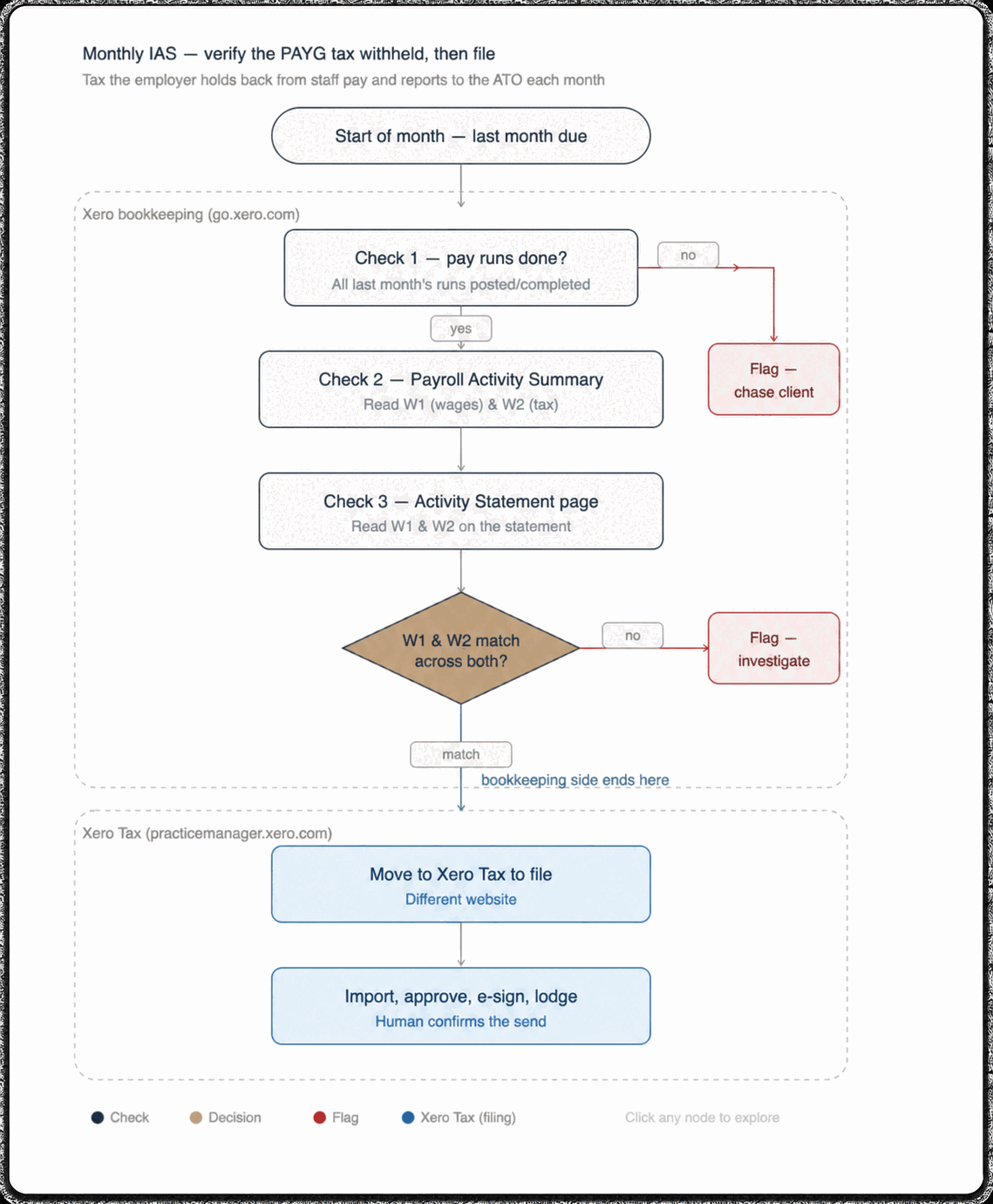
This is an in-progress Xero workflow that verifies a client’s monthly Australian PAYG withholding position before a human approves and lodges it. It runs three checks — that the previous month’s pay runs are posted, and that W1 and W2 agree between the Payroll Activity Summary and the Activity Statement — and then stops. It does not file anything.
The goal is deliberately narrow: reduce the repetitive effort of verifying each client’s monthly PAYG withholding position. It is not a system for automatically filing an IAS.
In short:
- Three checks: pay runs posted, W1 and W2 in the Payroll Activity Summary, W1 and W2 in the Activity Statement. It proceeds only if the figures agree.
- Production path: the supported Xero public API, because it is repeatable, monitored and maintainable.
- Under research: a private in-session route that allows an exact-value comparison. Not deployable.
- Where it stops: at the Xero Tax handoff. Approval and lodgement stay with a human.
Why I didn’t just build it
One client workflow kept repeating: check payroll, check the Activity Statement, move it through to Xero Tax, get approval and lodge.
It looked like a straightforward automation project. But the more I investigated, the clearer it became that a blind build would be the wrong move.
What are W1 and W2?
IAS means Instalment Activity Statement. This project is focused on monthly PAYG withholding.
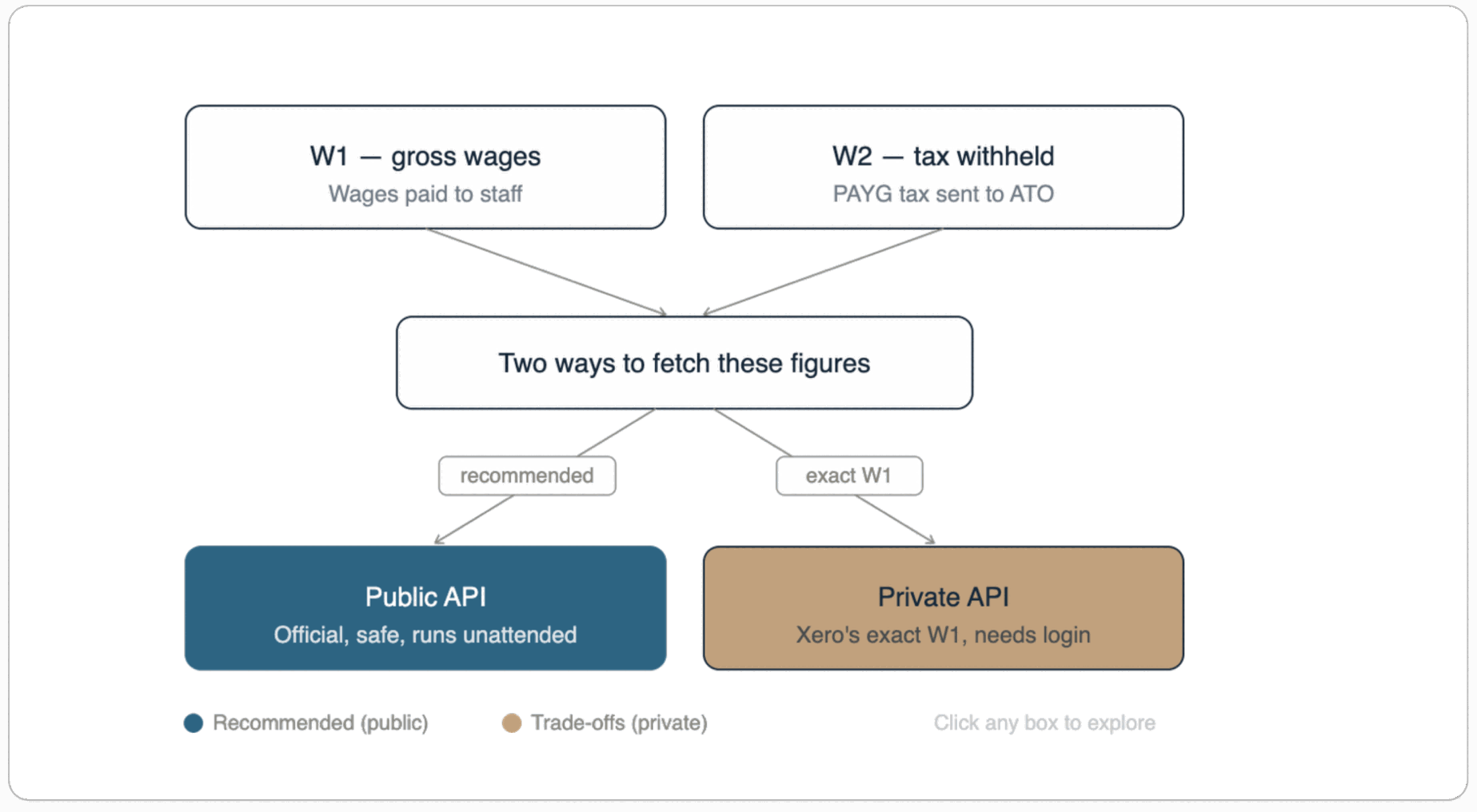
W1 is total salary, wages and other payments. W2 is the amount withheld from those payments. The automation needs to respect both numbers, not just the tax total.
Which checks does the workflow run?
The workflow has three explicit checks:
- Confirm the previous month’s pay runs are posted.
- Read W1 and W2 in the Payroll Activity Summary.
- Read W1 and W2 in the Activity Statement.
Only then does it proceed, and only if the figures agree.
How do you get W1 and W2 out of the Xero public API?
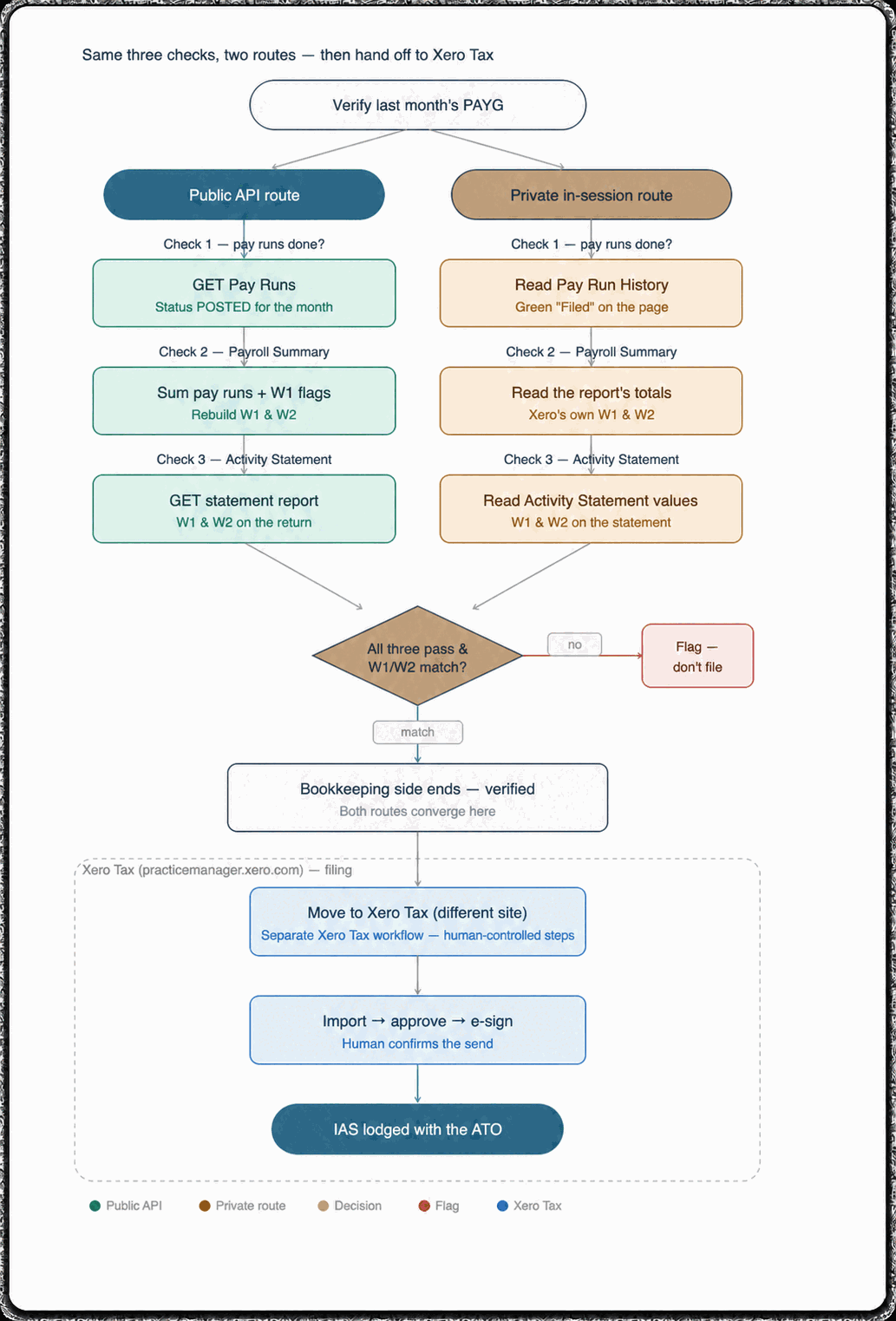
The primary production path is the supported public API because it is the route I can design to be repeatable, monitored and maintained.
For W2, the logic is reasonably direct: select the relevant posted pay runs by payment date and sum their tax totals.
W1 needs more care. A naïve total of every earnings line is not reliable. The workflow needs to retrieve pay items and earnings settings, identify the earnings rates reportable as W1, then aggregate only the relevant payslip earnings lines for each employee and pay run.
That is more deliberate than moving a single report total around, but it makes the calculation explainable. If a result looks wrong, I can trace how it was built.
Why not use Xero’s private in-session route?
During my technical investigation, I also explored the private in-session/UI route. It can surface Xero-calculated Payroll Activity Summary W1 and W2 alongside the Activity Statement W1 and W2 values expected to be filed.
That makes an exact-value comparison possible without line-by-line re-derivation, which is why I am evaluating it as the primary verification check. The public API remains the supported production path; the exploratory comparison is valuable because it tests whether the reconstructed values match the values Xero itself presents.
This research matters because uncommon overtime, deductions, adjustments or special earnings categories can make a simplistic reconstruction diverge unless every classification rule is implemented correctly. I am treating the private route as research, not a deployable foundation: I will not build a workflow that depends on an undocumented interface without first proving that it is reliable, governed and safe to operate.
Where does the automation stop?
Once payroll status and both W1/W2 comparisons have passed, the bookkeeping verification is complete. The next steps happen in Xero Tax: import, obtain client approval and e-signature, then lodge. A human remains responsible for that decision and send.
The system should flag missing payroll runs and mismatches for review. It should not assume that every business has the same reporting calendar or automatically file anything. For example, a business with quarterly GST can receive monthly IAS forms for early months and a BAS for the relevant quarterly period.
What makes it worth trusting
The next step is testing the public-API reconstruction across representative payroll scenarios and documenting the exceptions. The goal is not to make the workflow look clever. It is to make every comparison repeatable, explainable and useful to the person responsible for the next decision.
That is the difference between a quick demo and an automation a firm can rely on each month.
Need help mapping a high-volume workflow without removing its human controls? Book a workflow audit with me.
This article is about workflow design and is not tax, legal or compliance advice. Reporting obligations and circumstances vary; confirm the correct treatment with a qualified Australian tax professional.